For brick-and-mortar retailers using Shopify and Shopify POS.
A missed call can come from someone checking stock, arranging a visit or trying to buy an item they cannot evaluate online. It can also be a service question or an unrelated call. The first improvement is a reliable response process. Once that process works, the store can investigate which inquiries eventually lead to recorded purchases instead of assuming every missed ring represents lost revenue.
Reviewed and updated October 15, 2026.
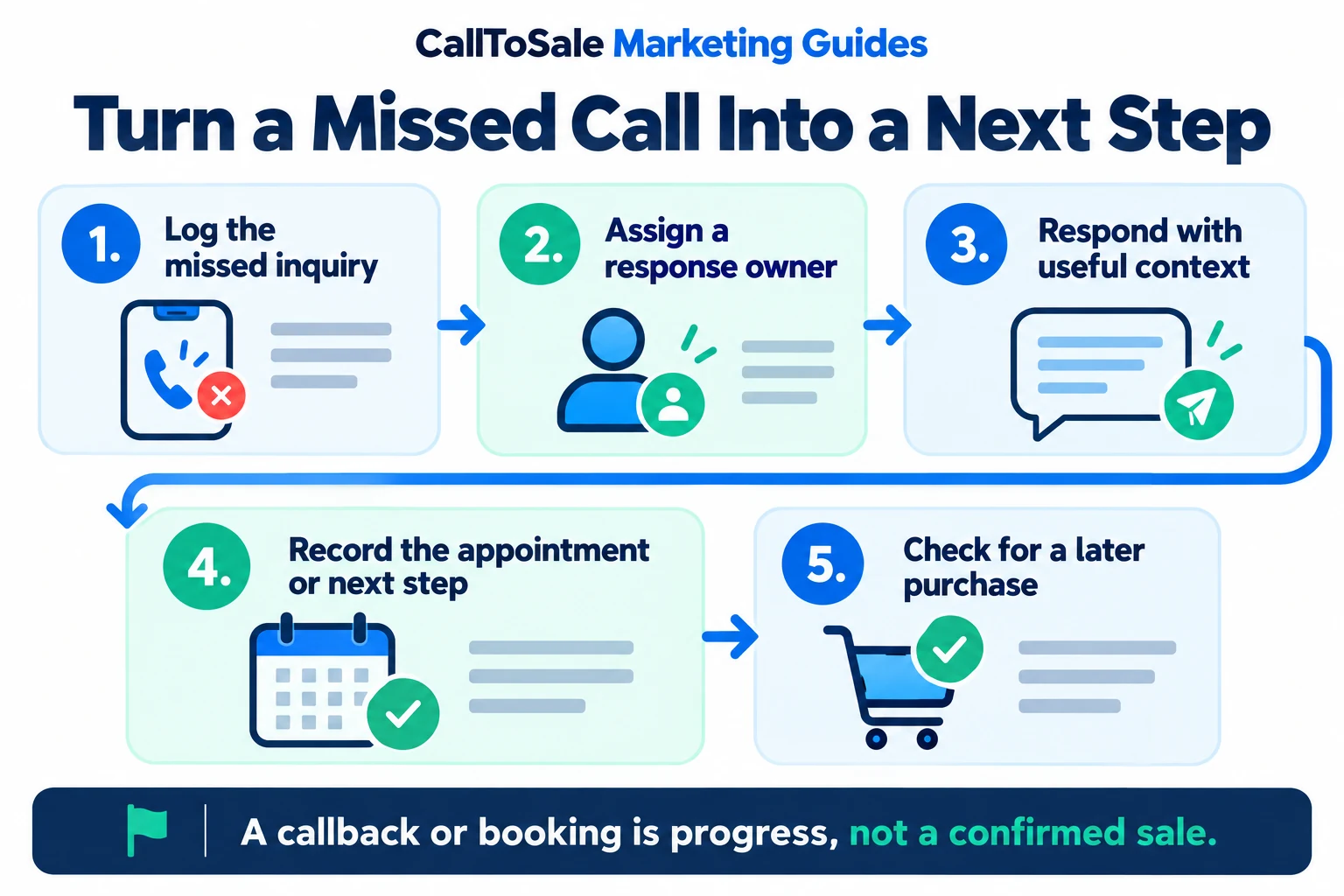
Open the full-size infographic
Find when and why calls go unanswered
Review a representative period that includes busy shifts, lunch breaks and after-hours inquiries. Separate unanswered new inquiries from repeat attempts and non-sales calls. Check whether callers reach the right team and whether the greeting explains the next step. Look for patterns before adding another tool: unclear ownership and a phone ringing in an unattended area are process problems worth fixing directly.
Give every inquiry an owner and a next action
Assign a person or role to review missed calls during each shift. Agree on a realistic response target appropriate to your opening hours, then measure whether the team follows it. A shared list should show the inquiry time, assigned owner, attempted response and unresolved question. Avoid a system where everyone assumes someone else called back.
Make the first response useful
When you have the customer's permission and an appropriate channel, respond with context and an easy next step. A simple callback can establish the item, preferred location and urgency. If the store uses an automated acknowledgement, make clear what happens next and ensure the team follows through. Do not send an answer about availability until staff have checked the relevant stock information.
Record the outcome of the conversation
Useful outcomes include stock information provided, appointment offered, quote requested, support issue assigned or no response after the agreed attempts. Keep these categories understandable. A returned call is not automatically a qualified lead, and a booking is not a completed sale. Recording the stage helps managers see whether the problem is response coverage, inquiry quality or a later sales handoff.
Connect the follow-up to the store visit
Give the associate who will meet the shopper the product interest and promised action. Keep the verified contact record available. For a Shopify POS store, attach the appropriate customer to any later order so the configured tracking workflow can review the relationship. A shopper who never purchases should remain visible as an inquiry rather than being assigned an invented sales value.
Run a weekly exception review
Review unresolved inquiries, repeated missed attempts and purchases that staff expected to match but could not connect. Ask what information was missing and improve that point in the process. Use a hypothetical example in training: a customer asks about a sofa, receives a callback and visits on Saturday. The booking shows progress; the paid order is a separate outcome. Follow both without conflating them.
How CallToSale can help your store
CallToSale reviews the connection between identifiable calls and forms, customer records and purchases recorded in Shopify POS. The standard service requires Shopify and Shopify POS. Your audit confirms the supported integrations, matching requirements and scope for your accounts. Missing identifiers and anonymous purchases can remain unmatched; the workflow does not guarantee attribution or increased revenue.
Keep learning
Frequently asked questions
Is every missed call a lost sale?
No. Calls have different purposes and some callers never become buyers. Review outcomes rather than assigning a sales value to every ring.
Who should handle callbacks?
Assign a specific role on each shift and make unresolved inquiries visible during handoffs.
How fast should a store respond?
Choose a realistic target that fits your business hours and staffing, then check whether the team consistently meets it.
Does an automated text replace a callback?
An acknowledgement can support the process, but staff still need to handle the customer's question and promised next step.
What should a response record include?
Keep the inquiry time, owner, response attempts, customer need and next action or outcome.
Does an appointment prove a sale happened?
No. Track the booking and the eventual purchase as distinct stages.
How does this connect to Shopify POS?
A reliable customer relationship between the inquiry and order can support the configured matching workflow.
What should we improve first?
Start with clear ownership and a useful response routine, then review the inquiry-to-purchase record quality.
Find the gaps in your store sales tracking
Request a free Shopify POS sales tracking audit to review your inquiry, customer and order workflow. You can also see how CallToSale works, compare plans or browse the Marketing Guides.