For brick-and-mortar retailers using Shopify and Shopify POS.
A busy phone does not tell you how much revenue your marketing produced. Some callers ask about opening hours, some need support and others become store customers. To understand the sales journey, a retailer needs a usable connection between the inquiry and the eventual purchase. For stores using Shopify and Shopify POS, that means coordinating the call record, follow-up contact and checkout process.
Reviewed and updated October 15, 2026.
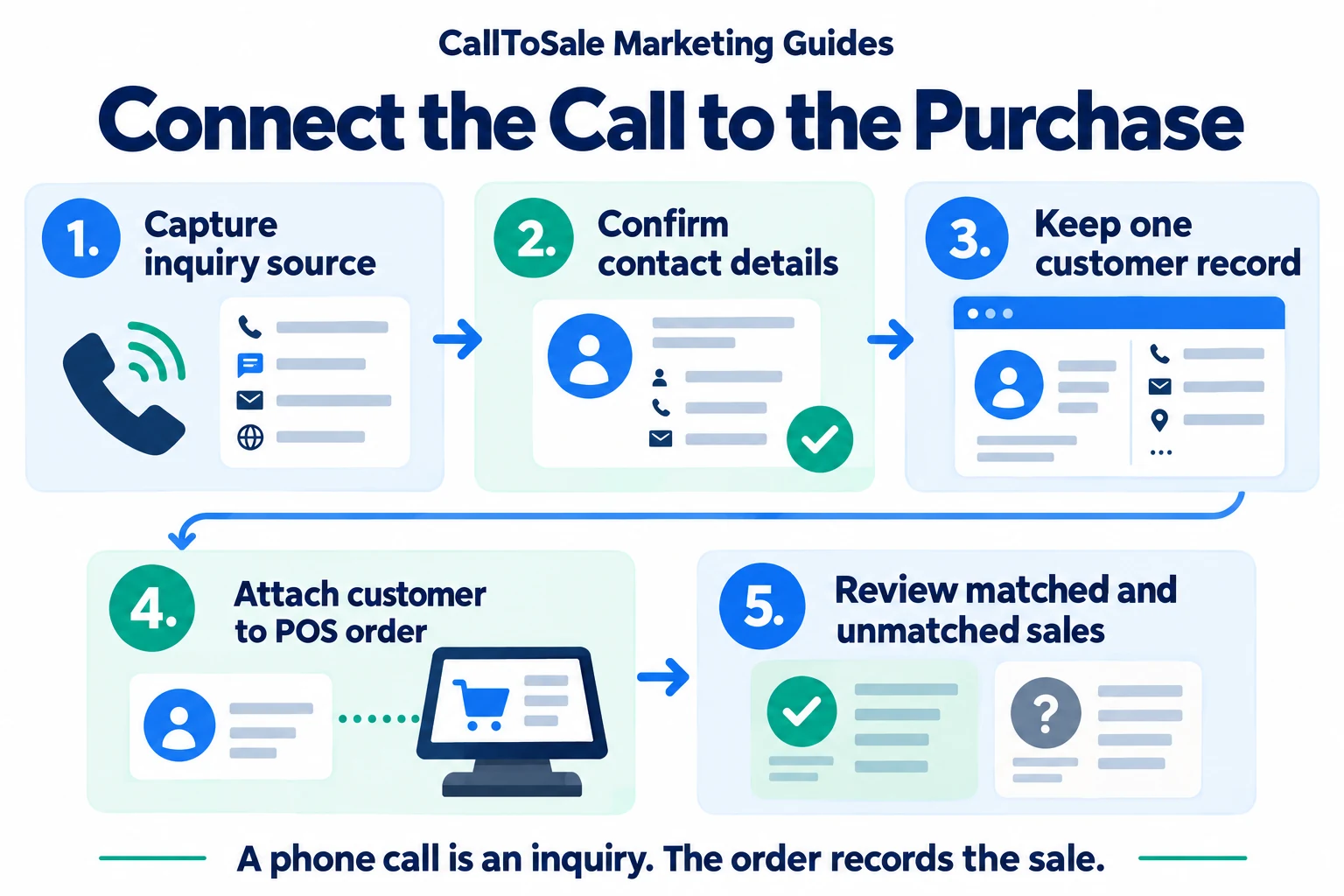
Open the full-size infographic
Keep the original call and its purpose
Capture the inquiry time, available marketing source and reason for calling. Distinguish new-purchase interest from delivery questions, warranty support and wrong numbers. A useful call outcome might be product advice given, appointment booked or quote requested. Avoid labeling all answered calls as qualified leads. A short service call can be valuable customer care without representing a new advertising-generated purchase opportunity.
Confirm a contact detail the customer will use again
Ask for an email or phone when it helps deliver the requested quote, appointment details or follow-up. Explain the purpose naturally. Do not assume that the displayed caller number belongs to the person who will place the order. Families and business buyers may use shared numbers. Keep the information needed for the retail transaction and respect the customer's preferences about additional communication.
Give the store associate a useful handoff
A short note should tell the next staff member what the customer needs, what was promised and who owns the next action. Include the product interest as context without making it the only matching key. If a colleague takes over on another day, the inquiry should still be understandable. Avoid making a shopper repeat the entire conversation because the information remained in one person's notebook.
Attach the right customer at checkout
Shopify supports adding customer profiles to POS orders. Build a staff routine around searching existing records before creating another profile. Confirm the relevant contact detail rather than selecting the first familiar name. If there are conflicting records, use your store's review process. An incorrect customer association can damage both customer service and attribution, even if it makes the reporting match rate look better.
Treat repeat conversations as one journey where appropriate
A buyer may call three times, visit twice and place one order. Keep those interactions available, but do not turn them into three separate buyers or three purchases. Use the completed order reference for the sales outcome. If the customer returns for another independent purchase, retain that order separately and decide how your reporting distinguishes acquisition from repeat business.
Review call-to-purchase outcomes with your team
Take a small set of recent inquiries and trace them manually. Can the team find the contact, follow-up, store order and value without guessing? List missing details and unclear handoffs. A hypothetical shopper who calls about an e-bike test ride and later purchases an accessory package still belongs to one customer journey; the final order records what actually sold. Use this review to improve the process before relying on summary conversion rates.
How CallToSale can help your store
CallToSale reviews the connection between identifiable calls and forms, customer records and purchases recorded in Shopify POS. The standard service requires Shopify and Shopify POS. Your audit confirms the supported integrations, matching requirements and scope for your accounts. Missing identifiers and anonymous purchases can remain unmatched; the workflow does not guarantee attribution or increased revenue.
Keep learning
Further reading
Frequently asked questions
Is caller ID enough to match every sale?
No. Shared numbers, different purchasing contacts and changed details can make a caller number an unreliable link on its own.
What should staff record during a sales inquiry?
Record the customer's need, available source, confirmed contact detail, promised next action and responsible staff member.
Should support calls be counted as new sales leads?
Keep support activity visible, but separate it from new-purchase inquiries when measuring customer acquisition.
What if the customer buys something else?
Use the verified customer relationship to review the final purchase. Product interest alone should not determine attribution.
How should repeated calls be counted?
Keep interaction counts and unique customer counts separate, and use the order reference to prevent duplicate purchase totals.
Can an anonymous checkout be matched reliably?
It may remain unmatched when the required relationship to the earlier inquiry is missing. Do not assign a source by guesswork.
Does call tracking replace Shopify POS?
No. Call tracking describes the inquiry; Shopify POS records the purchase. The configured workflow connects relevant records.
What should we test before launch?
Trace an inquiry through the contact record to a test order, then check value, identifiers, duplication and the handling of reversals.
Find the gaps in your store sales tracking
Request a free Shopify POS sales tracking audit to review your inquiry, customer and order workflow. You can also see how CallToSale works, compare plans or browse the Marketing Guides.