For brick-and-mortar retailers using Shopify and Shopify POS.
Sales tracking often depends on a small checkout habit: attaching the correct customer to the order. A marketing integration cannot reliably repair every anonymous purchase, duplicate profile or mistyped contact detail after the fact. This checklist helps a Shopify POS team build useful records while keeping the checkout conversation simple.
Reviewed and updated October 15, 2026.
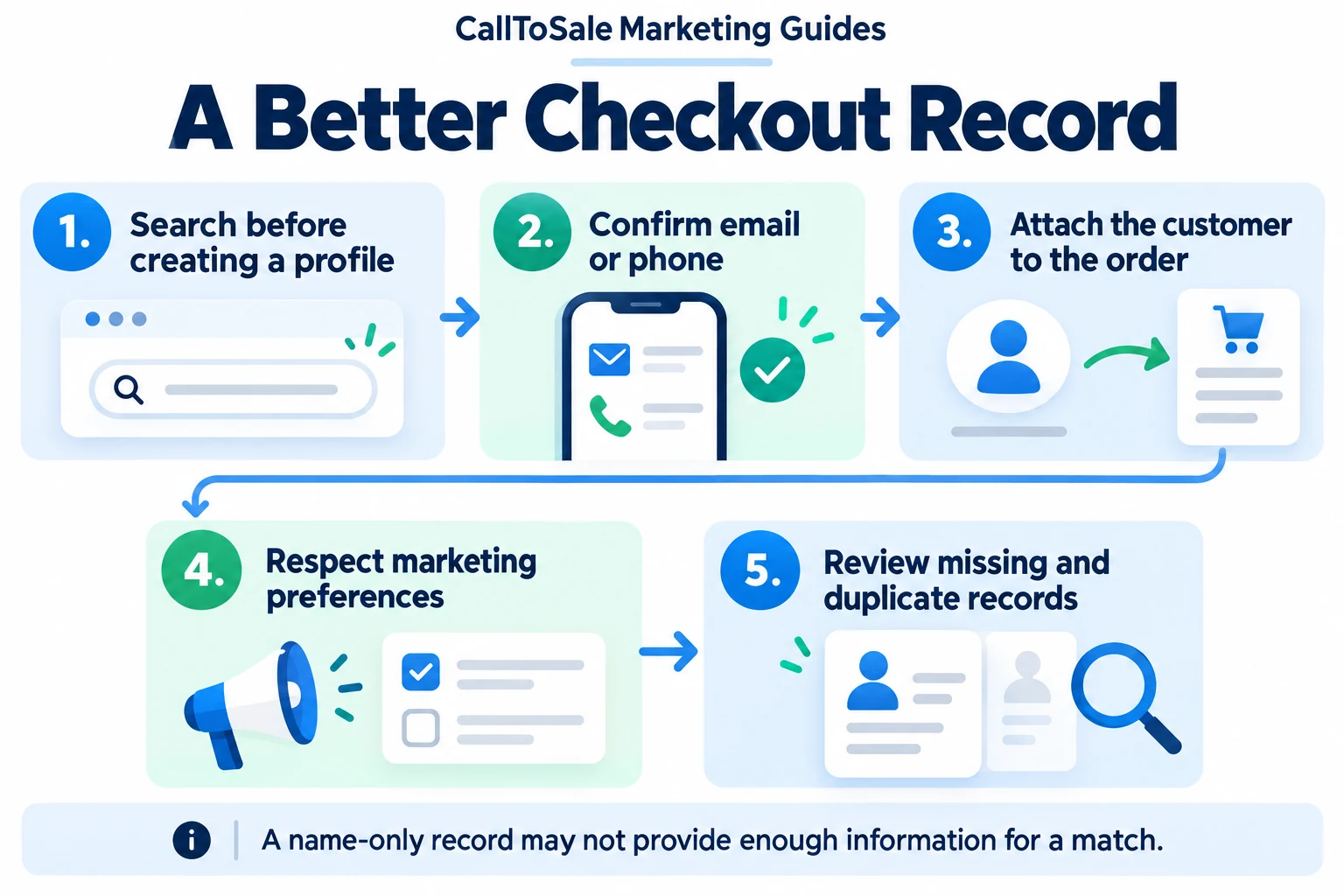
Open the full-size infographic
Before the shift: agree on a short staff routine
Explain why customer details matter for receipts, service and appropriate follow-up. Decide who reviews ambiguous records and how staff should handle a customer who declines to share information. Keep the process short enough to use during busy periods. A written checklist beside the register is more useful than a complicated rule nobody remembers when a queue forms.
Search before creating a new profile
Ask whether the customer has contacted the store or purchased before. Search using an appropriate contact detail, and verify the result with the shopper. Do not select a profile only because the first name looks familiar. If two records appear to belong to the same person, flag them for review under your store's process. Creating a third record avoids the decision temporarily but makes later reporting harder.
Confirm useful contact information
A polite question such as 'Which email should we use for your receipt and this order?' gives the shopper context. Verify obvious typing mistakes and use the detail relevant to the earlier inquiry when appropriate. Shopify customer profiles can hold email, phone and marketing preferences. A name alone may not provide the relationship needed by your matching workflow. Collect what the process actually requires rather than filling every available field.
Attach the customer to this order
A customer existing somewhere in the database does not establish that a particular receipt belongs to them. Confirm the selected profile is associated with the current cart or order. Keep the order reference available for later review. Where your Shopify plan and settings support checkout prompts, assess whether recommended or required details fit your operating process; verify those options in your own account.
Keep service information and marketing preferences distinct
Providing a contact detail for a receipt or order question should not be treated as blanket permission for every future promotion. Record the customer's stated preferences through the supported controls and follow your established communication rules. Avoid storing unnecessary sensitive information in free-text notes. A useful retail note describes the product need or promised action without collecting information that the transaction does not require.
After the shift: review a small sample
Check orders with no customer, conflicting contact details and possible duplicate profiles. Track these as operational exceptions rather than blaming individual associates. If problems cluster at a specific handoff, improve the instruction or screen flow. Compare the available record with the original inquiry before changing data. The aim is accurate customer relationships, not a match percentage achieved by forcing uncertain records together.
How CallToSale can help your store
CallToSale reviews the connection between identifiable calls and forms, customer records and purchases recorded in Shopify POS. The standard service requires Shopify and Shopify POS. Your audit confirms the supported integrations, matching requirements and scope for your accounts. Missing identifiers and anonymous purchases can remain unmatched; the workflow does not guarantee attribution or increased revenue.
Keep learning
Further reading
Frequently asked questions
Does a customer profile guarantee attribution?
No. The source information, correct order relationship, supported integration and platform requirements still matter.
Should staff always create a new profile?
Search and verify an existing profile first to reduce unnecessary duplicate records.
Is a customer's name enough for every match?
No. Common or incomplete names may not reliably connect a purchase with an earlier inquiry.
What if the customer declines to share details?
Follow your store's checkout policy, respect the decision and allow the sale to remain unmatched when necessary.
Does receipt contact information mean promotional consent?
Treat receipt and order communication separately from marketing preferences. Use your supported preference controls and established rules.
Should we merge records just to increase matches?
No. Review uncertain records carefully and use your approved customer-data process before making changes.
Who should review missing customer details?
Assign a store manager or trained owner for recurring exception review, with a clear path for staff questions.
How often should the checkout process be checked?
Use a manageable recurring sample and review again after staff, checkout settings or integrations change.
Find the gaps in your store sales tracking
Request a free Shopify POS sales tracking audit to review your inquiry, customer and order workflow. You can also see how CallToSale works, compare plans or browse the Marketing Guides.