For furniture stores using Shopify and Shopify POS. This guide is for owners looking for an offline conversion tracking solution that connects online marketing, calls and website inquiries to purchases made in store. The standard CallToSale service requires both Shopify and Shopify POS with the relevant sales recorded there.
A furniture shopper can compare sofas online, call about dimensions, visit your showroom twice and finally buy at the counter. The purchase is valuable, but a website report may show only a product-page visit. Furniture store marketing attribution connects the inquiry with the later order so you can see which sources produced recorded revenue.
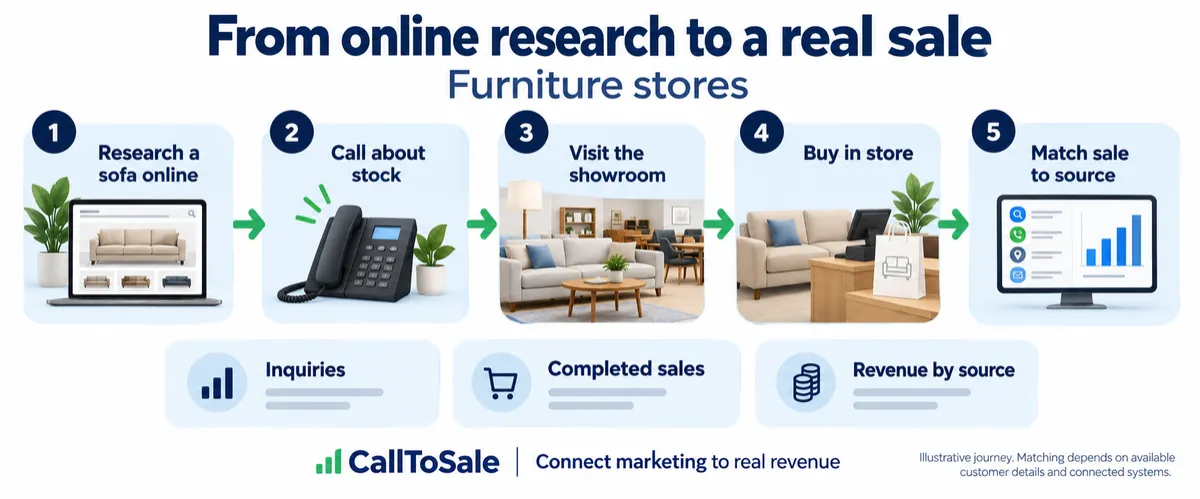
Open full-size infographic
Why showroom sales disappear from ad reports
Consider a customer who clicks an ad for a sectional, asks about fabric options and buys a different model a week later. Looking only at the advertised product or online checkout misses that journey. Tracking the customer across the inquiry and sale is more useful than expecting the final order to match the first product viewed. Keep the original campaign source with the contact, then connect that contact to the actual order.
Make the showroom handoff practical
Give staff a short process: find or create the customer, confirm their phone number or email, and attach that profile to the purchase. If someone has already called, look for the existing record rather than creating another one. For walk-ins with no identifiable earlier inquiry, ask how they found the store and record that answer separately. A staff-reported source should not be presented as a verified ad click.
Use deposits and deliveries consistently
Furniture orders can involve deposits, special orders, delivery charges and later adjustments. Decide what your revenue report represents before comparing campaigns. An order placed, a deposit received and a fully paid sale are different events. Preserve the order reference and account for refunds or cancellations so the same sofa is not counted several times. Your tracking should follow the business's actual order process rather than treating every payment as a new customer.
What to review each month
Compare inquiries, matched orders and recorded sales value by campaign and channel. Look at how long people take to purchase and how many sales lack customer details. Those gaps reveal where the showroom process needs improvement. Revenue alone does not describe profitability, so review discounts, fulfillment costs and product margins in your own business reporting before making spending decisions.
A practical example for your Shopify POS workflow
A shopper clicks a sofa campaign, calls to check fabric availability and later purchases a dining set at your counter. The useful connection is the customer's inquiry and Shopify POS order, not an assumption that the advertised sofa was sold. Keep the campaign source and final order reference together. If the customer places a deposit, define whether your report measures the order value or cash received, then follow that choice consistently.
Carry fabric and showroom inquiries into the furniture order
Keep the original phone or form inquiry reference when a shopper requests dimensions, fabric samples or a showroom visit. If they later choose a different collection, update the product interest while retaining the verified customer relationship.
Before staff create a checkout profile, check for the contact used in the inquiry. Confirm the buyer’s details when another household member called, and record unverified walk-in sources separately from captured advertising information.
Reconcile deposits, delivery and cancelled items
Reconcile one completed furniture order with its deposit, final balance and delivery charges. Use a stable order reference and a consistent revenue definition so staged payments do not count as several sofa sales.
Review cancelled special orders, returned items and delivery adjustments before comparing campaign totals. Keep unmatched purchases and later accessory orders visible rather than assigning them to the first furniture ad the shopper may have seen.
How the CallToSale retail workflow fits
For stores using Shopify and Shopify POS, the standard setup connects identifiable calls and forms with customer records in HighLevel and purchases recorded in Shopify. CallRail supplies call-tracking information. Available source details are retained with the contact, and eligible purchase events can be reported through connected marketing integrations. Your team must attach accurate customer information to the sale; anonymous purchases and missing identifiers can remain unmatched.
This workflow does not guarantee revenue growth or attribution for every sale. Shopify subscriptions, advertising spend and the requirements of each connected platform still matter. If your completed transactions live in another system, contact CallToSale for an integration assessment before choosing a standard plan.
Frequently asked questions
Is this guide for furniture stores using Shopify POS?
Yes. It is written for businesses using both Shopify and Shopify POS that want to connect online marketing, calls and inquiries to recorded in-store purchases. A Shopify website alone does not put transactions from another sales system into the standard workflow.
Why do I need CallRail for offline conversion tracking?
CallRail provides the call-tracking part of the journey, including available source and call details. The recorded Shopify POS purchase supplies the sales outcome. The two records need reliable customer details and the configured connection to be matched.
What does HighLevel add to the marketing workflow?
HighLevel keeps contact records, available lead-source details and configured follow-up together. Connect Plus includes a managed workspace and missed-call text-back. Insights adds the advertised review-request and win-back features. Messaging depends on customer permissions and setup.
Will every in-store purchase be matched to an ad?
No. Anonymous orders, missing or changed contact details, duplicate records and unavailable identifiers can prevent a match. A recorded purchase event also does not guarantee that an ad platform will credit a particular campaign.
Can the workflow include Google Ads, Meta and Microsoft Ads?
The workflow diagram shows these marketing channels. The available connection and reporting scope must be confirmed for your accounts during the audit. Eligible events depend on the identifiers, permissions, integration setup and matching rules of each platform.
Do I have to buy new CallRail and HighLevel subscriptions?
Connect is for businesses that already maintain active paid subscriptions to both providers. Connect Plus and above provide the advertised managed CallRail and HighLevel services. Shopify subscriptions, advertising spend, setup fees and applicable usage charges remain separate as described on the pricing and checkout pages.
Does every showroom visit become an attributed sale?
No. A match needs an identifiable contact and a recorded purchase. Anonymous visits and incomplete customer information can remain unmatched.
What should my team do before requesting a tracking audit?
Confirm that the relevant transactions are recorded in Shopify POS, review whether staff attach customer profiles to purchases and gather the details of your website, marketing accounts and phone setup. Use the free audit to confirm the scope before selecting a plan.
Find out whether your sales can be matched
Start with a review of your website, inquiry process and completed sales records. Request a free sales tracking audit to confirm the fit for your business. You can also see the tracking workflow and compare CallToSale plans. The standard service requires Shopify and Shopify POS; other sales systems need a separately confirmed integration scope.