For brick-and-mortar retailers using Shopify and Shopify POS.
A shopper can discover your store through Google Ads, call about an item and buy at your counter several days later. An online checkout report will not describe that whole journey. For a brick-and-mortar retailer using Shopify and Shopify POS, the useful question is which identifiable inquiries can be connected to recorded purchases. This guide explains the records, decisions and checks that make that connection useful.
Reviewed and updated October 15, 2026.
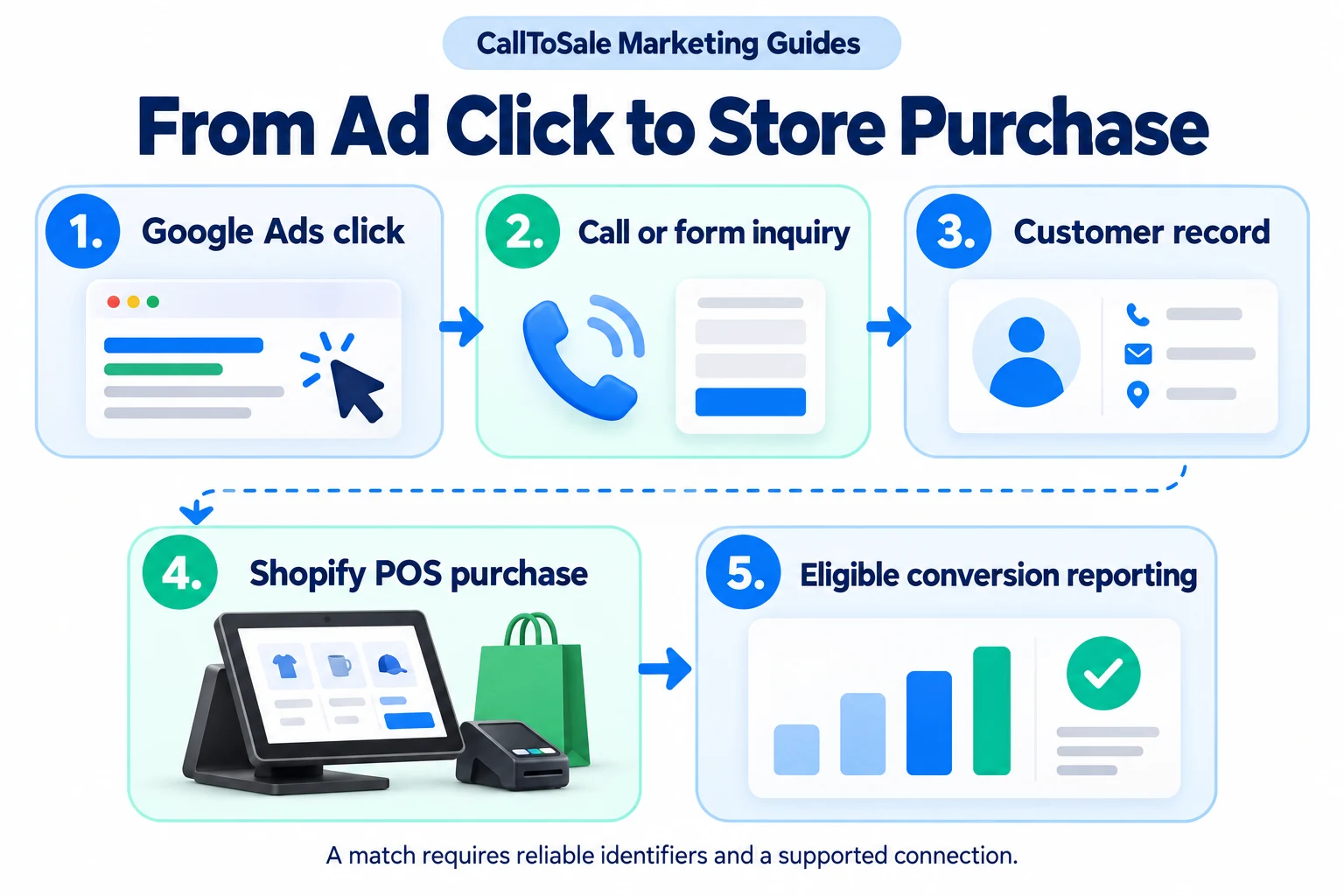
Open the full-size infographic
Start with a purchase definition, not a dashboard
Choose what your business will count as a sale before connecting any accounts. A phone conversation, showroom appointment, deposit and completed order are different events. Decide whether your purchase measure uses paid orders, fulfilled orders or another clearly defined status. Document the value, currency, order reference and treatment of refunds. Your staff, reporting provider and agency should use the same definition when discussing campaign results.
Keep the ad source with the inquiry
When a visitor becomes a lead, retain the available campaign details and supported identifiers with the contact record. A phone inquiry needs its tracking context; a form needs its submitted details and source context. Google describes offline conversion imports as a way to measure later outcomes following ad clicks or calls. The specific method depends on the journey and account setup. Do not assume that every caller has a usable click identifier or that one integration covers every kind of interaction.
Connect the customer to the Shopify POS order
At checkout, search for the existing customer and confirm the email or phone used during the inquiry. Attach the appropriate customer record to the order. If a shopper uses a different contact detail, review the records before merging anything. A receipt with no reliable relationship to the lead should remain unmatched. Guessing a campaign because the customer bought a promoted item creates a misleading result.
Separate your matched-order report from Google's attribution
Your internal report can show that a lead and an order were linked through your configured rules. An eligible event can then be sent through a supported connection, subject to the platform's requirements. Google decides whether and how that event receives campaign credit. Check acceptance, diagnostics and the conversion action as separate steps. A successful upload does not promise attribution, and an attributed sale does not prove that the ad caused an otherwise impossible purchase.
Test the complete path before changing your budget
Use an authorized test inquiry and order, clearly identified as a test and handled according to your store's normal procedures. Check the original source, contact relationship, order reference, time, currency and value. Then check for duplicate events and confirm how a refund would be handled. Do not create an artificial ad click to force a match. A test validates the configured workflow; it does not establish future campaign performance.
Review exceptions as well as successful matches
A furniture shopper might call about a sofa and later buy a dining table. The customer relationship can connect the journey even when the product changes. Another shopper may pay anonymously and remain unmatched. Review both situations weekly. Keep total POS sales, matched sales, platform-attributed sales and ad spend in separate columns, with a note about the reporting window. That makes missing information visible instead of hiding it inside a reassuring total.
How CallToSale can help your store
CallToSale reviews the connection between identifiable calls and forms, customer records and purchases recorded in Shopify POS. The standard service requires Shopify and Shopify POS. Your audit confirms the supported integrations, matching requirements and scope for your accounts. Missing identifiers and anonymous purchases can remain unmatched; the workflow does not guarantee attribution or increased revenue.
Keep learning
Further reading
Frequently asked questions
Does Shopify POS automatically connect every store sale to Google Ads?
Do not assume it does. Confirm the source records, customer relationship and reporting connection used for your particular setup.
Is a phone call an offline purchase conversion?
A call is an inquiry. A purchase conversion needs the defined sales outcome and the records required by the chosen connection.
Will every order receive campaign credit?
No. Missing identifiers, anonymous purchases, platform rules and the measurement window can prevent a match or campaign credit.
Can a shopper buy a different product from the one they asked about?
Yes. Keep the verified customer relationship and final order rather than matching only on the originally discussed product.
Should deposits and balance payments count as two sales?
Use one documented order-value policy. Avoid counting several payments for the same purchase as several new purchases.
Can refunds change my advertising report?
They can affect the revenue you should report. Check the supported adjustment process rather than assuming every destination updates automatically.
Is this the same as Google's store visits feature?
No. Store visits and recorded purchase events measure different outcomes and have different requirements.
How can CallToSale help a Shopify POS store?
Request an audit of your phone, form, customer and order workflow to confirm the supported connections and scope before selecting a plan.
Find the gaps in your store sales tracking
Request a free Shopify POS sales tracking audit to review your inquiry, customer and order workflow. You can also see how CallToSale works, compare plans or browse the Marketing Guides.