For brick-and-mortar retailers using Shopify and Shopify POS.
Your store reports a strong sales week, but the advertising dashboard shows a different number. That difference does not automatically mean the checkout data is wrong or the ads are ineffective. The reports may cover different channels, dates, customers and attribution rules. Start by making their definitions comparable before changing a campaign or replacing a tracking tool.
Reviewed and updated October 15, 2026.
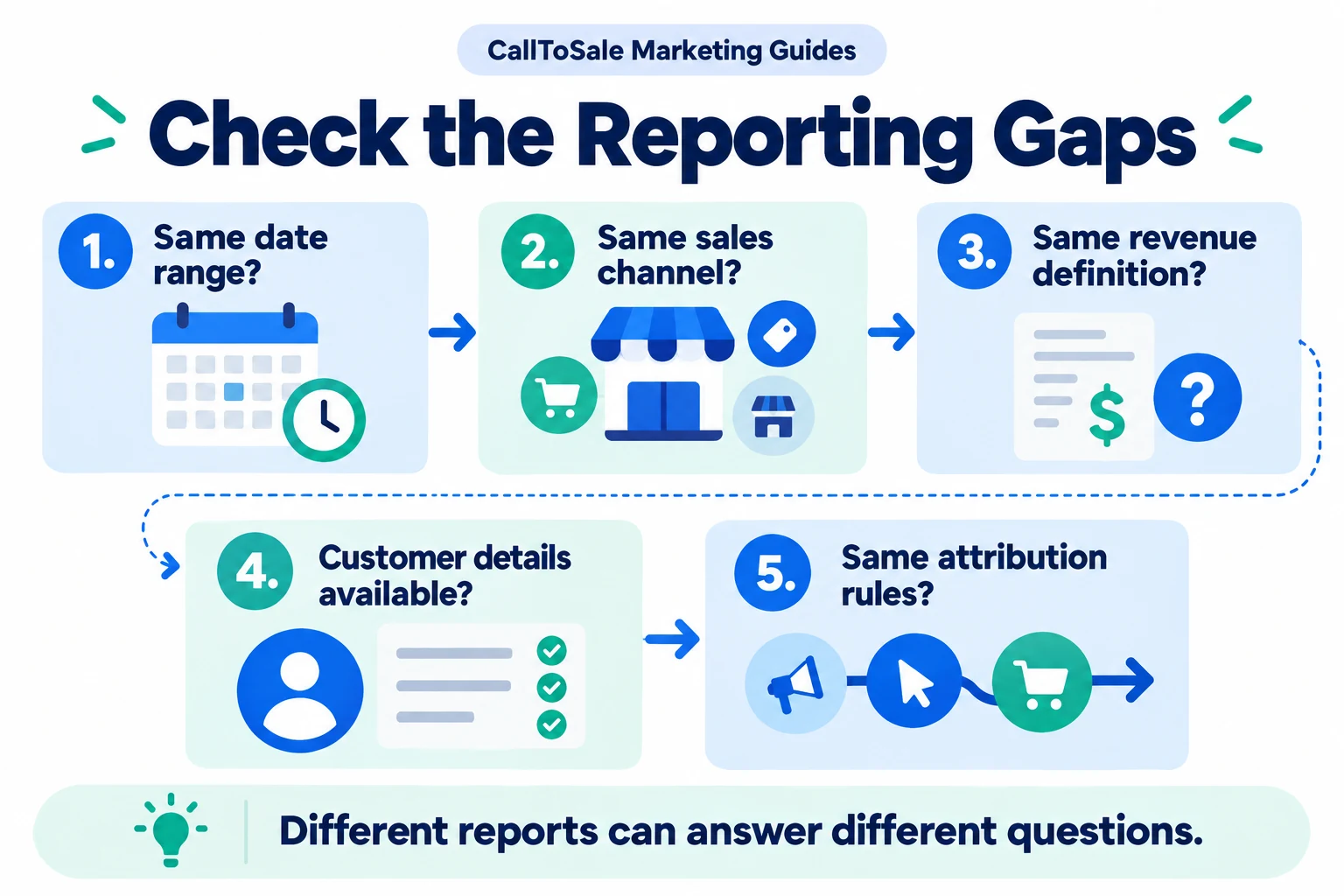
Open the full-size infographic
First check what each report includes
Write a one-sentence description above each export. One might contain all store orders, another only matched lead-to-order purchases and another only conversions credited by an ad platform. Shopify's marketing reports describe Online Store channel activity, so do not use that scope as a substitute for a complete POS attribution workflow. Identify the channel and location filters behind every number you compare.
Align the dates and reporting windows
Use the same store locations, currencies, time zone and date boundaries. Also ask which event determines the reporting date: ad interaction, inquiry, order or later adjustment. A campaign can generate a call this week and a purchase next month. An order-date report and an ad-interaction-date report can both be internally consistent while showing different weekly totals. Label them rather than forcing the values to match.
Agree on the meaning of revenue
Compare equivalent amounts. Discounts, tax, delivery, installation, returns and cancelled items can all change the value being reported. A deposit and a later balance payment must not accidentally duplicate one order's full value. Put your chosen definition in writing and retain the order reference. When a refund appears, follow the adjustment process used by your internal report and each connected destination.
Find missing and incorrect customer relationships
Check a sample of unmatched orders. Was a customer attached? Does the contact detail correspond to the original inquiry? Did two staff members create separate profiles? A profile with only a common name can be difficult to distinguish. Treat missing matches as a data-quality question first. Raising the match rate by assigning uncertain sales to campaigns makes the report less trustworthy.
Look for duplicates and delayed processing
Several integrations may send the same purchase. Compare order references and event types before summing totals. Also check processing status and documented reporting delays. Repeatedly resending a record without checking the connection's deduplication rules can complicate the diagnosis. Keep a simple issue log containing the affected order, expected outcome, observed outcome and the stage that needs attention.
Reconcile a sample before comparing the whole month
Choose a manageable group of orders spanning a matched purchase, an anonymous sale, a refund and a repeat customer. Follow each record through the same checkpoints. Build separate columns for total POS revenue, eligible matched revenue, sent events and platform-attributed value. The objective is to explain the differences. Once the sample makes sense, expand the review and use the same definitions in your agency meeting.
How CallToSale can help your store
CallToSale reviews the connection between identifiable calls and forms, customer records and purchases recorded in Shopify POS. The standard service requires Shopify and Shopify POS. Your audit confirms the supported integrations, matching requirements and scope for your accounts. Missing identifiers and anonymous purchases can remain unmatched; the workflow does not guarantee attribution or increased revenue.
Keep learning
Further reading
Frequently asked questions
Should all POS revenue appear in my ad account?
No. Total store revenue can include organic, repeat, anonymous and other purchases that do not qualify for that platform's attribution.
Does a reporting difference prove the tracking is broken?
No. Check the report scope and definitions, then investigate records that still differ unexpectedly.
Can time zones affect daily totals?
Yes. Orders near a day boundary can fall on different dates when systems use different time zones.
Why can a refunded order remain in an advertising report?
The refund may need a supported adjustment workflow. Confirm what is sent and accepted instead of assuming automatic updates.
Can two integrations double-count a purchase?
They can create duplicate reporting risks. Review order identifiers, conversion actions and deduplication behavior.
What is the first export to review?
Start with a defined sample of POS orders and their references, dates, customer links, status and chosen revenue values.
Should unmatched revenue be removed from business totals?
No. Keep it in total sales while showing it separately from revenue that can be reliably connected to a marketing source.
How can CallToSale assess the mismatch?
An audit can review your report definitions and inquiry-to-order workflow to identify the supported matching and reporting scope.
Find the gaps in your store sales tracking
Request a free Shopify POS sales tracking audit to review your inquiry, customer and order workflow. You can also see how CallToSale works, compare plans or browse the Marketing Guides.