For brick-and-mortar retailers using Shopify and Shopify POS.
Return on ad spend becomes more useful when the revenue includes purchases made at your store counter, not only website checkouts. The calculation is straightforward; choosing defensible inputs takes more care. This guide explains how a Shopify POS retailer can report matched purchase revenue alongside advertising cost without confusing ROAS with profit or treating all store sales as ad-generated.
Reviewed and updated October 15, 2026.
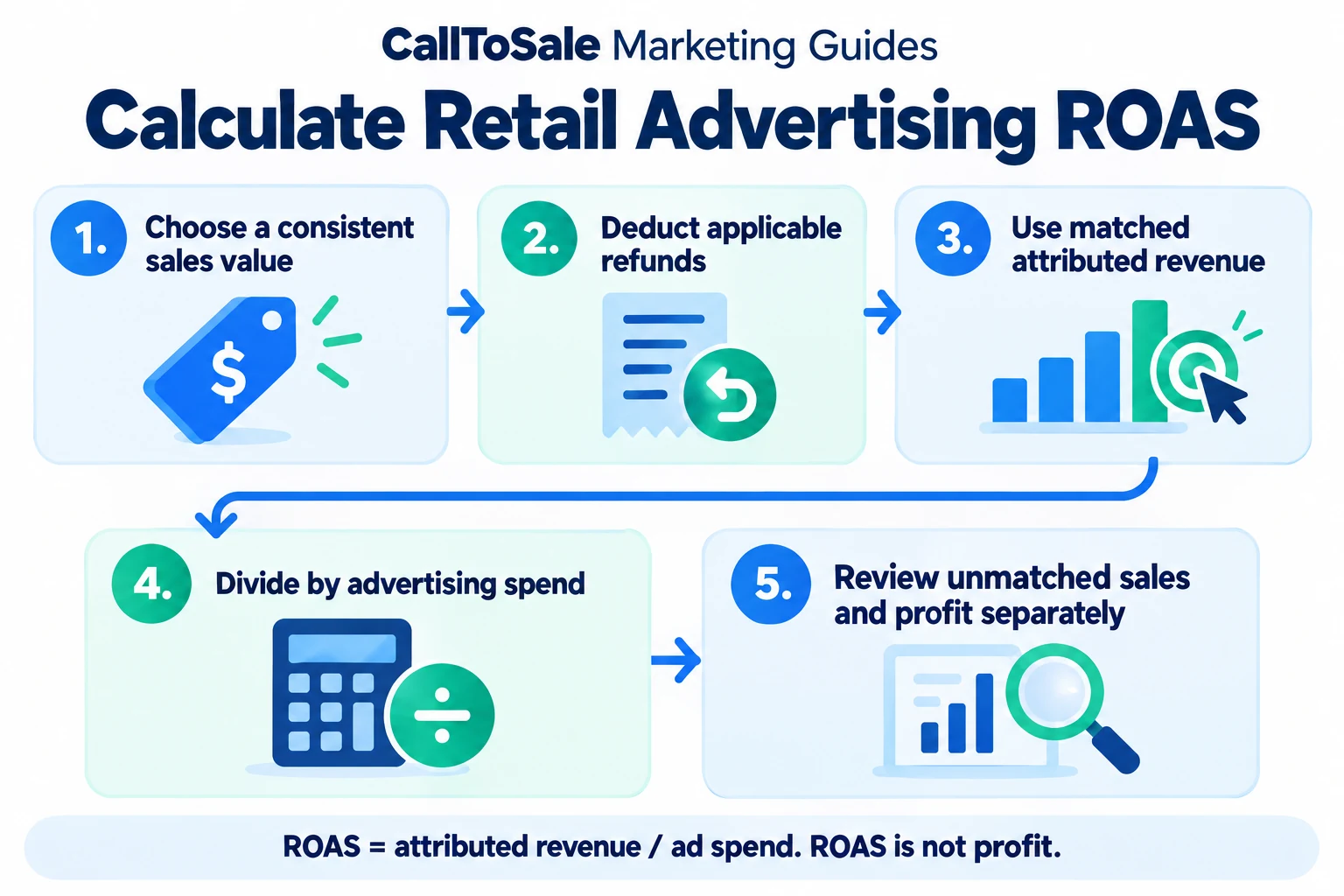
Open the full-size infographic
Write the calculation and define the scope
Advertising ROAS equals attributed revenue divided by advertising spend for the defined campaign and reporting period. State whether the result comes from your internal matching report or an ad platform's own attribution. Keep those methods labeled. Do not combine an internal first-touch total and a platform-attributed total as though they represent additional, independent revenue.
Choose one revenue definition
Decide whether the numerator includes discounts, tax, shipping, installation and other charges. Apply that policy consistently across campaigns. Keep the order reference and status so deposits, balance payments and fulfillment updates do not create duplicate full-order revenue. If your comparison changes from gross sales to a refund-adjusted measure, explain the change instead of presenting the difference as a campaign improvement.
Use attributed sales, not every store receipt
An order belongs in a campaign's attributed revenue only under the matching and attribution rules you have defined. Keep unmatched sales visible in the business total but separate from the attributed numerator. Repeat purchases also need a clear policy. A customer first acquired through an ad can return months later for reasons that your original acquisition report does not fully explain.
A worked example with hypothetical numbers
Suppose a campaign costs $1,200. Under a defined matching method, eight completed orders produce $6,000 in revenue after the adjustments included in your policy. ROAS is $6,000 divided by $1,200, or 5.0x. That means five dollars of attributed revenue per advertising dollar. If another $3,000 of store sales cannot be matched, report it separately. These numbers illustrate the arithmetic; they are not a CallToSale client result or a revenue promise.
Check profitability outside the ROAS calculation
A 5.0x revenue ratio does not reveal the store's profit. Product cost, staff time, fulfillment, rent, discounts and service fees still matter. For a planning exercise, calculate the contribution remaining before advertising and compare it with ad cost. Keep assumptions explicit. A high-ticket category with substantial delivery costs can behave differently from a lower-ticket category with repeat purchases, even when their reported ROAS looks similar.
Review the lag before moving the budget
Show the time between inquiry and order alongside the ratio. Recent campaigns may still be producing purchases that have not occurred yet. Compare periods with similar maturity and document the attribution window. Review sample orders when a result changes sharply. Budget decisions should consider order quality, matching coverage, returns and operational capacity rather than one isolated ratio from an incomplete week.
How CallToSale can help your store
CallToSale reviews the connection between identifiable calls and forms, customer records and purchases recorded in Shopify POS. The standard service requires Shopify and Shopify POS. Your audit confirms the supported integrations, matching requirements and scope for your accounts. Missing identifiers and anonymous purchases can remain unmatched; the workflow does not guarantee attribution or increased revenue.
Keep learning
Further reading
Frequently asked questions
What is the ROAS formula?
Divide revenue attributed under your stated method by the advertising spend included in the same comparison.
Does 5x ROAS mean five dollars of profit?
No. It means five dollars of attributed revenue per advertising dollar before other business costs are considered.
Should I include all Shopify POS revenue?
Only include revenue supported by your chosen attribution rules in the campaign numerator. Keep total and unmatched sales separately visible.
Should tax and delivery be included?
Choose and document a consistent revenue policy. The useful comparison is one whose included values are clear and equivalent.
How should returns affect the calculation?
Apply the refund and adjustment policy you have defined, and identify the period and original order involved.
Can I compare internal and Google-reported ROAS?
Yes, with clear labels and definitions. Different attribution methods and reporting dates can produce different results.
What ROAS should every retail store aim for?
There is no universal target. Margins, costs, purchase timing, repeat business and measurement coverage affect the decision.
Are the example numbers a CallToSale case study?
No. They are hypothetical numbers provided to demonstrate the calculation, not a client result or forecast.
Find the gaps in your store sales tracking
Request a free Shopify POS sales tracking audit to review your inquiry, customer and order workflow. You can also see how CallToSale works, compare plans or browse the Marketing Guides.