For mattress stores using Shopify and Shopify POS. This guide is for owners looking for an offline conversion tracking solution that connects online marketing, calls and website inquiries to purchases made in store. The standard CallToSale service requires both Shopify and Shopify POS with the relevant sales recorded there.
A mattress shopper may compare brands online but want to try several models before buying. Your website can influence the visit even when the purchase happens entirely in the store. Mattress store offline sales tracking helps connect identifiable inquiries to the checkout transaction, allowing you to review marketing against recorded purchases.
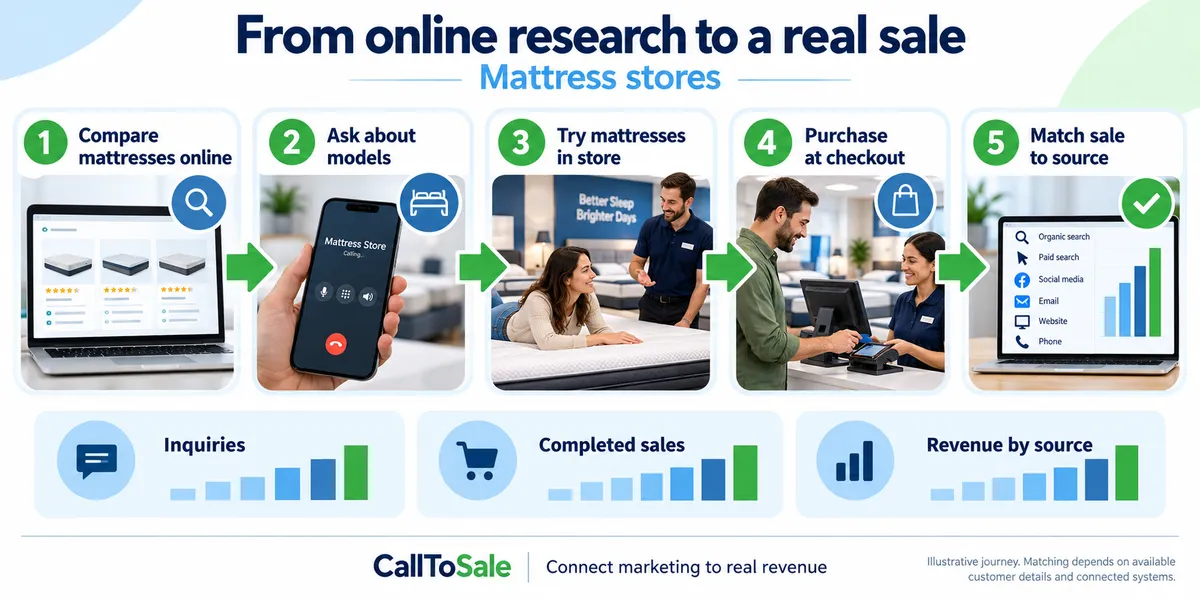
Open full-size infographic
Track the journey rather than one model
The mattress that attracted a click may not be the mattress the customer ultimately chooses. Save the original campaign source with the contact and match the customer to the final order. Product-level reporting can still show what sold, but a different model should not break the relationship between the earlier inquiry and the later purchase.
Build customer capture into checkout
At the register, find the existing customer profile or create one using a confirmed phone number or email. Attach the profile to the order before completing the sale. Ask unidentified walk-ins how they heard about the store and record that answer as a self-reported source. Explain why you request contact details, and do not treat a purchase as permission for unrelated marketing messages.
Account for bundles and returns
A mattress order may include a base, pillows, delivery or other items. Use a consistent definition of sales value when reporting the order. Returns, exchanges and cancelled deliveries should be reflected in your business records so the reported outcome does not remain permanently inflated. Keep the transaction reference when an exchange updates an existing purchase.
Review the path from inquiry to sale
Compare inquiry volume, matched orders, purchase timing and unmatched transactions by source. These measures help you distinguish a campaign that attracts questions from one associated with actual orders. Consider seasonality and promotions when comparing periods. Store staff's ability to attach the right customer record is just as important as the tracking configuration.
A practical example for your Shopify POS workflow
A shopper compares mattress firmness online, calls to check a size and visits to try several models. The eventual purchase may include a frame and accessories. Store the inquiry source with the customer, then use the actual Shopify POS order rather than the price of the first mattress viewed. If the order is exchanged, review the adjustment instead of presenting both the original and replacement as new customer acquisitions.
Keep trial visits tied to the original mattress inquiry
When shoppers call about firmness, availability or a showroom visit, preserve their inquiry reference and available source. Returning to try another mattress should continue the same shopping journey rather than create another acquired customer.
At checkout, confirm the contact details used during the first inquiry. Keep different household members distinct unless staff can verify how the inquiry connects to the purchasing customer.
Reconcile mattress orders and comfort exchanges
Compare the final mattress order with any foundation, delivery, discounts and deposit payments. Define the sales value consistently rather than using an advertised mattress price as the assumed conversion value.
Review comfort exchanges, cancellations and returns against the original order. A replacement mattress or later balance payment should not automatically become another acquisition event. Keep unmatched orders visible in the monthly review.
How the CallToSale retail workflow fits
For stores using Shopify and Shopify POS, the standard setup connects identifiable calls and forms with customer records in HighLevel and purchases recorded in Shopify. CallRail supplies call-tracking information. Available source details are retained with the contact, and eligible purchase events can be reported through connected marketing integrations. Your team must attach accurate customer information to the sale; anonymous purchases and missing identifiers can remain unmatched.
This workflow does not guarantee revenue growth or attribution for every sale. Shopify subscriptions, advertising spend and the requirements of each connected platform still matter. If your completed transactions live in another system, contact CallToSale for an integration assessment before choosing a standard plan.
Frequently asked questions
Is this guide for mattress stores using Shopify POS?
Yes. It is written for businesses using both Shopify and Shopify POS that want to connect online marketing, calls and inquiries to recorded in-store purchases. A Shopify website alone does not put transactions from another sales system into the standard workflow.
Why do I need CallRail for offline conversion tracking?
CallRail provides the call-tracking part of the journey, including available source and call details. The recorded Shopify POS purchase supplies the sales outcome. The two records need reliable customer details and the configured connection to be matched.
What does HighLevel add to the marketing workflow?
HighLevel keeps contact records, available lead-source details and configured follow-up together. Connect Plus includes a managed workspace and missed-call text-back. Insights adds the advertised review-request and win-back features. Messaging depends on customer permissions and setup.
Will every in-store purchase be matched to an ad?
No. Anonymous orders, missing or changed contact details, duplicate records and unavailable identifiers can prevent a match. A recorded purchase event also does not guarantee that an ad platform will credit a particular campaign.
Can the workflow include Google Ads, Meta and Microsoft Ads?
The workflow diagram shows these marketing channels. The available connection and reporting scope must be confirmed for your accounts during the audit. Eligible events depend on the identifiers, permissions, integration setup and matching rules of each platform.
Do I have to buy new CallRail and HighLevel subscriptions?
Connect is for businesses that already maintain active paid subscriptions to both providers. Connect Plus and above provide the advertised managed CallRail and HighLevel services. Shopify subscriptions, advertising spend, setup fees and applicable usage charges remain separate as described on the pricing and checkout pages.
Will tracking identify every person who tries a mattress?
No. Anonymous visits are not automatically identified. Matching relies on captured inquiries and customer details associated with a recorded order.
What should my team do before requesting a tracking audit?
Confirm that the relevant transactions are recorded in Shopify POS, review whether staff attach customer profiles to purchases and gather the details of your website, marketing accounts and phone setup. Use the free audit to confirm the scope before selecting a plan.
Find out whether your sales can be matched
Start with a review of your website, inquiry process and completed sales records. Request a free sales tracking audit to confirm the fit for your business. You can also see the tracking workflow and compare CallToSale plans. The standard service requires Shopify and Shopify POS; other sales systems need a separately confirmed integration scope.