For flooring and cabinet showrooms using Shopify and Shopify POS. This guide is for owners looking for an offline conversion tracking solution that connects online marketing, calls and website inquiries to purchases made in store. The standard CallToSale service requires both Shopify and Shopify POS with the relevant sales recorded there.
A flooring or cabinet purchase often moves through samples, consultations, measurements and revised quotes. The first website inquiry does not tell you whether a project became an order. Showroom lead attribution follows the identifiable customer through those milestones and connects the final recorded sale with the earlier source.
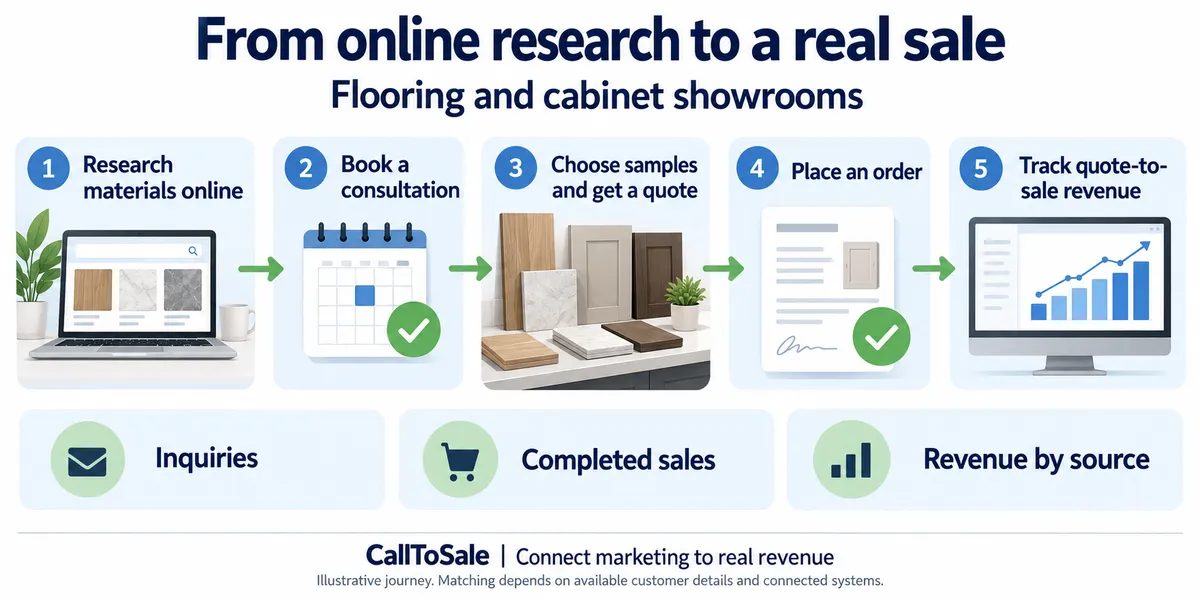
Open full-size infographic
Keep revised quotes with the original inquiry
A project can change materials, dimensions or scope several times. Preserve the customer and source across those revisions, using stable quote or project references. Avoid treating every revised estimate as a new lead. The initial product interest is useful context, but the final order may contain a different material or product range.
Choose the milestone you are measuring
A consultation booked, a quote sent, a deposit received and a completed order are different outcomes. Decide which ones appear in your reporting and how their values are represented. Counting a quote at full value as though it were a purchase can overstate results. Deposits and balance payments also need a consistent relationship to the same underlying order.
Connect the actual order system
The standard CallToSale setup is designed for Shopify and Shopify POS. If your showroom records project orders in estimating or contractor-management software, review that connection before purchasing. Confirm access to the final transaction, customer identifiers and order reference. A Shopify catalog does not, by itself, establish that the project revenue is available for matching.
Use reporting to examine the handoff
Compare inquiries, consultation attendance, quotes and matched orders by source. Check how long projects take to become purchases and where records lose their customer details. Keep self-reported walk-in sources separate from verified ad identifiers. Campaign revenue and project profitability answer different questions, so review material, labor and fulfillment costs in your own business records.
Connect online inquiries to in-store Shopify POS purchases
A flooring or cabinet buyer may collect samples, request measurements and revise a quote before ordering. Keep the original source with the customer through that process, then connect the Shopify POS order when it is recorded. A sample pickup is not automatically a sale. Use consistent treatment for deposits, installation charges and later change orders so one project does not look like several independently acquired customers.
Carry the inquiry through samples and revised quotes
Keep a project reference with the original inquiry when shoppers request samples or book a measurement. A quote revision should update the existing project rather than creating another acquisition event.
Confirm who placed the inquiry and who owns the final order when homeowners, installers and designers are involved. Match using verified customer details and avoid merging contacts solely because they share a job site.
Distinguish showroom orders from project payments
Define whether reporting counts a materials order, a deposit or payment for a completed project. Preserve the order reference across additional payments, changes in quantities and cancelled line items.
Review sales that remain in a quoting or installation system separately from Shopify POS orders. Reconcile recorded materials value and refunds before attributing project revenue to the campaign that generated a sample request.
How the CallToSale retail workflow fits
For stores using Shopify and Shopify POS, the standard setup connects identifiable calls and forms with customer records in HighLevel and purchases recorded in Shopify. CallRail supplies call-tracking information. Available source details are retained with the contact, and eligible purchase events can be reported through connected marketing integrations. Your team must attach accurate customer information to the sale; anonymous purchases and missing identifiers can remain unmatched.
This workflow does not guarantee revenue growth or attribution for every sale. Shopify subscriptions, advertising spend and the requirements of each connected platform still matter. If your completed transactions live in another system, contact CallToSale for an integration assessment before choosing a standard plan.
Frequently asked questions
Is this guide for flooring and cabinet showrooms using Shopify POS?
Yes. It is written for businesses using both Shopify and Shopify POS that want to connect online marketing, calls and inquiries to recorded in-store purchases. A Shopify website alone does not put transactions from another sales system into the standard workflow.
Why do I need CallRail for offline conversion tracking?
CallRail provides the call-tracking part of the journey, including available source and call details. The recorded Shopify POS purchase supplies the sales outcome. The two records need reliable customer details and the configured connection to be matched.
What does HighLevel add to the marketing workflow?
HighLevel keeps contact records, available lead-source details and configured follow-up together. Connect Plus includes a managed workspace and missed-call text-back. Insights adds the advertised review-request and win-back features. Messaging depends on customer permissions and setup.
Will every in-store purchase be matched to an ad?
No. Anonymous orders, missing or changed contact details, duplicate records and unavailable identifiers can prevent a match. A recorded purchase event also does not guarantee that an ad platform will credit a particular campaign.
Can the workflow include Google Ads, Meta and Microsoft Ads?
The workflow diagram shows these marketing channels. The available connection and reporting scope must be confirmed for your accounts during the audit. Eligible events depend on the identifiers, permissions, integration setup and matching rules of each platform.
Do I have to buy new CallRail and HighLevel subscriptions?
Connect is for businesses that already maintain active paid subscriptions to both providers. Connect Plus and above provide the advertised managed CallRail and HighLevel services. Shopify subscriptions, advertising spend, setup fees and applicable usage charges remain separate as described on the pricing and checkout pages.
Can a revised quote stay connected to the original campaign?
It can, when the customer and original source remain associated with the project. A revised quote should not erase the earlier inquiry history.
What should my team do before requesting a tracking audit?
Confirm that the relevant transactions are recorded in Shopify POS, review whether staff attach customer profiles to purchases and gather the details of your website, marketing accounts and phone setup. Use the free audit to confirm the scope before selecting a plan.
Find out whether your sales can be matched
Start with a review of your website, inquiry process and completed sales records. Request a free sales tracking audit to confirm the fit for your business. You can also see the tracking workflow and compare CallToSale plans. The standard service requires Shopify and Shopify POS; other sales systems need a separately confirmed integration scope.