For car dealerships using Shopify and Shopify POS. This guide is for owners looking for an offline conversion tracking solution that connects online marketing, calls and website inquiries to purchases made in store. The standard CallToSale service requires both Shopify and Shopify POS with the relevant sales recorded there.
A vehicle shopper may browse inventory, call about availability, schedule a test drive and complete the deal days later. Counting the first form submission tells you about demand, but it does not identify every campaign that produced a completed sale. Car dealership offline conversion tracking starts with a reliable connection between the lead record and the final deal.
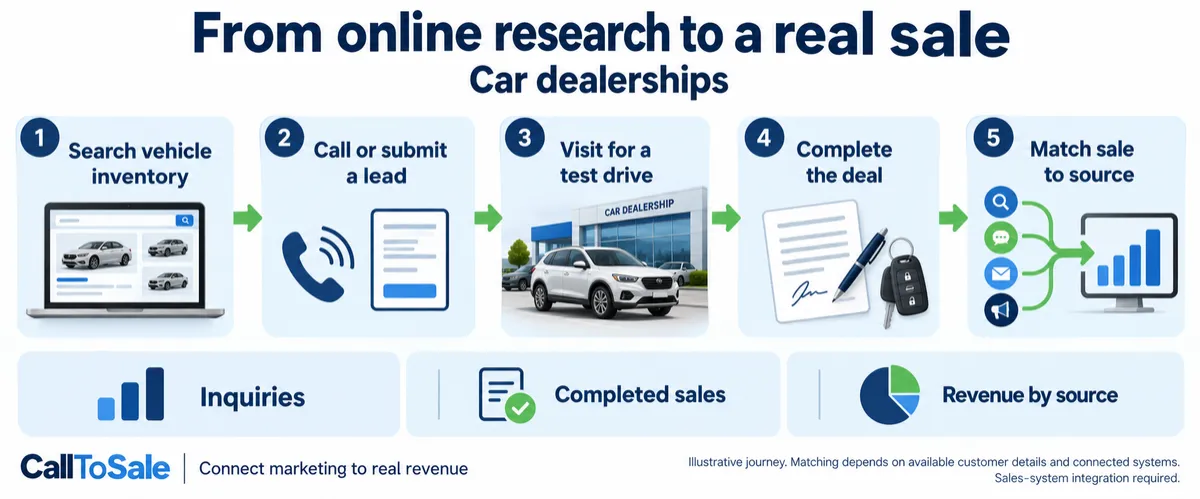
Open full-size infographic
Define what counts as a completed deal
A test-drive booking, a deposit and a delivered vehicle are separate milestones. Decide which event represents the completed sale for your reporting, using the actual status in your dealership's sales system. Keep cancellations and reversed transactions out of the completed-sale total. A unique deal or transaction reference is essential when several updates relate to the same vehicle purchase.
Preserve the original inquiry
Keep the campaign source, inquiry date, customer identifiers and relevant vehicle interest together. A shopper may switch models or buy a different unit, so the vehicle initially requested should not be the only matching key. Staff should confirm the existing lead record when the buyer returns. Review duplicate lead profiles rather than assuming every submission represents a new person.
Connect the dealership's sales system first
CallToSale's standard retail setup requires Shopify and Shopify POS. A dealership using a dealer management system needs a separate integration assessment before purchasing a standard package. That assessment should confirm access to completed deal records, reliable customer matching, transaction references and permitted data use. Exporting a list of leads alone does not establish a connection to completed vehicle sales.
Measure the full funnel without double counting
Track inquiries, appointments, attended visits and completed deals as distinct outcomes. Review completed-sale revenue alongside your own margin reporting; vehicle selling price is not the same as dealership profit. Keep unmatched deals in a separate bucket. Platform attribution depends on the identifiers, timing and rules of each connected ad account, so a transaction appearing in your internal report does not guarantee an ad platform will credit it.
A practical example for your Shopify POS workflow
A vehicle inquiry may lead to several calls, a test drive and a later deal. For this Shopify-focused workflow, confirm which completed transactions are actually recorded in Shopify POS before planning attribution. A vehicle deal that exists only in a dealership management system will not appear simply because the dealership has a Shopify accessories site. Keep the vehicle-sale scope separate and request an integration assessment when needed.
Keep vehicle inquiries linked across stock changes
When a shopper calls about a vehicle, keep the stock reference alongside the inquiry and customer details. If the shopper purchases another vehicle, preserve the original source and record the final stock item on the completed deal.
Have staff confirm the contact used for the first inquiry at the sales handoff. Test-drive appointments and quote revisions should remain identifiable as intermediate steps rather than automatically becoming new customers.
Check completed deals separately from leads and deposits
Reconcile a completed transaction against its stable deal reference, buyer details and final status. Keep reservations, finance approvals and deposits separate from the event your report defines as a completed sale.
Separate accessory orders recorded in Shopify POS from vehicle deals held in a dealership system. Verify each required connection before including those deals in marketing revenue, and report unmatched or cancelled deals explicitly.
How the CallToSale retail workflow fits
For stores using Shopify and Shopify POS, the standard setup connects identifiable calls and forms with customer records in HighLevel and purchases recorded in Shopify. CallRail supplies call-tracking information. Available source details are retained with the contact, and eligible purchase events can be reported through connected marketing integrations. Your team must attach accurate customer information to the sale; anonymous purchases and missing identifiers can remain unmatched.
This workflow does not guarantee revenue growth or attribution for every sale. Shopify subscriptions, advertising spend and the requirements of each connected platform still matter. If your completed transactions live in another system, contact CallToSale for an integration assessment before choosing a standard plan.
Frequently asked questions
Is this guide for car dealerships using Shopify POS?
Yes. It is written for businesses using both Shopify and Shopify POS that want to connect online marketing, calls and inquiries to recorded in-store purchases. A Shopify website alone does not put transactions from another sales system into the standard workflow.
Why do I need CallRail for offline conversion tracking?
CallRail provides the call-tracking part of the journey, including available source and call details. The recorded Shopify POS purchase supplies the sales outcome. The two records need reliable customer details and the configured connection to be matched.
What does HighLevel add to the marketing workflow?
HighLevel keeps contact records, available lead-source details and configured follow-up together. Connect Plus includes a managed workspace and missed-call text-back. Insights adds the advertised review-request and win-back features. Messaging depends on customer permissions and setup.
Will every in-store purchase be matched to an ad?
No. Anonymous orders, missing or changed contact details, duplicate records and unavailable identifiers can prevent a match. A recorded purchase event also does not guarantee that an ad platform will credit a particular campaign.
Can the workflow include Google Ads, Meta and Microsoft Ads?
The workflow diagram shows these marketing channels. The available connection and reporting scope must be confirmed for your accounts during the audit. Eligible events depend on the identifiers, permissions, integration setup and matching rules of each platform.
Do I have to buy new CallRail and HighLevel subscriptions?
Connect is for businesses that already maintain active paid subscriptions to both providers. Connect Plus and above provide the advertised managed CallRail and HighLevel services. Shopify subscriptions, advertising spend, setup fees and applicable usage charges remain separate as described on the pricing and checkout pages.
Does CallToSale automatically connect every dealership system?
No. The current standard offering is for Shopify POS retailers. Dealership sales systems require an integration review and a separately confirmed scope.
What should my team do before requesting a tracking audit?
Confirm that the relevant transactions are recorded in Shopify POS, review whether staff attach customer profiles to purchases and gather the details of your website, marketing accounts and phone setup. Use the free audit to confirm the scope before selecting a plan.
Find out whether your sales can be matched
Start with a review of your website, inquiry process and completed sales records. Request a free sales tracking audit to confirm the fit for your business. You can also see the tracking workflow and compare CallToSale plans. The standard service requires Shopify and Shopify POS; other sales systems need a separately confirmed integration scope.