For auto repair shops using Shopify and Shopify POS. This guide is for owners looking for an offline conversion tracking solution that connects online marketing, calls and website inquiries to purchases made in store. The standard CallToSale service requires both Shopify and Shopify POS with the relevant sales recorded there.
An auto repair shop can receive plenty of calls without knowing which marketing produced approved and completed work. Some callers need a price estimate, some are outside your service area and some never book. A useful tracking process connects the inquiry to the repair order and final invoice, giving you a clearer view of recorded job revenue.
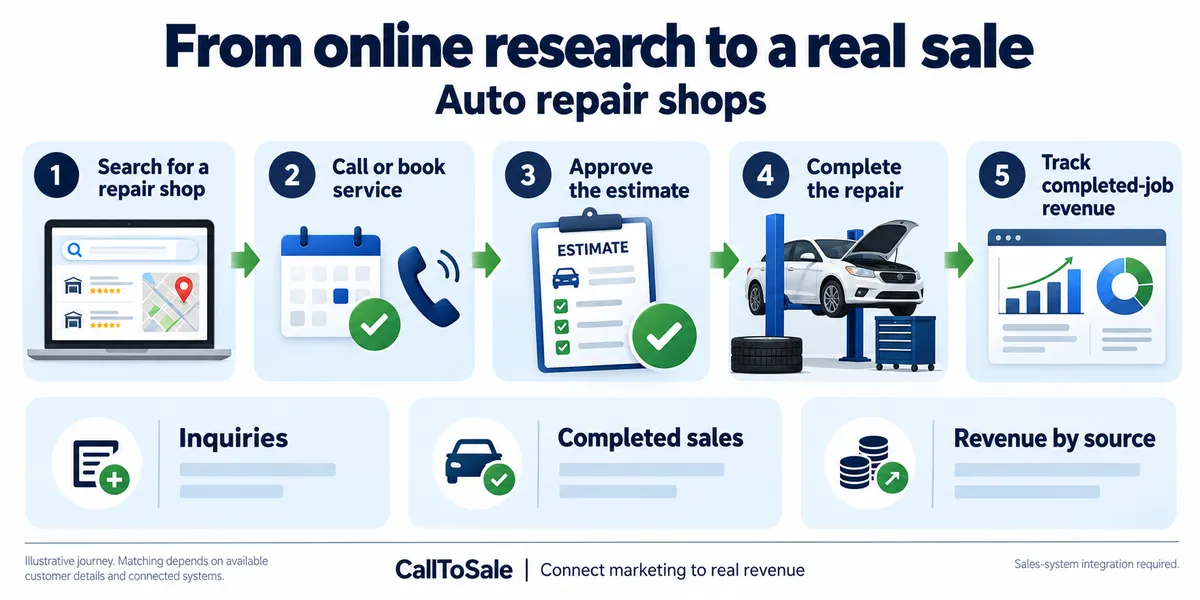
Open full-size infographic
Use completed work as a separate outcome
A phone call, an appointment and an approved estimate are different steps. Keep them distinct from a completed, paid repair invoice. Otherwise the same customer can appear to produce several sales as the job moves through your process. Use the repair-order or invoice reference to identify the final transaction and account for cancellations, refunds or reopened work.
Match the person, not just the vehicle
One customer may own several vehicles, and several people may contact the shop about one vehicle. Confirm the contact details associated with the original booking when work is completed. Vehicle details can support your internal process, but customer matching should not rely on a license plate or model alone. Staff should check for existing records before creating duplicates.
Separate new jobs from follow-up calls
A question about an existing repair or a warranty follow-up should not automatically count as a new sales opportunity. Categorize calls so you can see new inquiries, existing-customer updates and other contact types. This makes lead-quality reporting more meaningful and helps explain why a channel with many calls may produce a smaller number of new jobs.
Check repair-software compatibility
The standard CallToSale service connects Shopify and Shopify POS. A repair shop using dedicated shop-management software needs a custom integration assessment. Confirm that completed invoices, customer details and stable job references can be made available before assuming the service can measure job revenue. An appointment calendar without final invoice data gives only part of the picture.
A practical example for your Shopify POS workflow
A caller asks for a repair estimate, approves work after inspection and pays when collecting the vehicle. If that completed transaction is recorded in Shopify POS, keep the customer and order reference attached to the original inquiry. A booking alone is not the same outcome. If invoices live only in a shop management system, confirm the connection before assuming the standard Shopify workflow can report completed-job revenue.
Carry the original inquiry into the completed repair
Record the caller’s contact details and inquiry reference when an estimate or appointment is requested. Confirm those details when work is authorized; a vehicle description alone is not a reliable customer match.
Keep estimate calls, progress checks and warranty questions attached to the existing job where appropriate. Only a separately identified new repair inquiry should enter the new-opportunity count.
Reconcile invoices, repeat calls and refunds
Review one completed job from original inquiry to paid transaction. Compare the customer identifier, repair-order reference, payment status and recorded sale value before using campaign totals to assess performance.
Keep declined estimates, reopened work and refunds separate from completed paid jobs. If invoices remain solely in shop-management software, confirm the required integration before treating them as purchases available to the standard Shopify POS workflow.
How the CallToSale retail workflow fits
For stores using Shopify and Shopify POS, the standard setup connects identifiable calls and forms with customer records in HighLevel and purchases recorded in Shopify. CallRail supplies call-tracking information. Available source details are retained with the contact, and eligible purchase events can be reported through connected marketing integrations. Your team must attach accurate customer information to the sale; anonymous purchases and missing identifiers can remain unmatched.
This workflow does not guarantee revenue growth or attribution for every sale. Shopify subscriptions, advertising spend and the requirements of each connected platform still matter. If your completed transactions live in another system, contact CallToSale for an integration assessment before choosing a standard plan.
Frequently asked questions
Is this guide for auto repair shops using Shopify POS?
Yes. It is written for businesses using both Shopify and Shopify POS that want to connect online marketing, calls and inquiries to recorded in-store purchases. A Shopify website alone does not put transactions from another sales system into the standard workflow.
Why do I need CallRail for offline conversion tracking?
CallRail provides the call-tracking part of the journey, including available source and call details. The recorded Shopify POS purchase supplies the sales outcome. The two records need reliable customer details and the configured connection to be matched.
What does HighLevel add to the marketing workflow?
HighLevel keeps contact records, available lead-source details and configured follow-up together. Connect Plus includes a managed workspace and missed-call text-back. Insights adds the advertised review-request and win-back features. Messaging depends on customer permissions and setup.
Will every in-store purchase be matched to an ad?
No. Anonymous orders, missing or changed contact details, duplicate records and unavailable identifiers can prevent a match. A recorded purchase event also does not guarantee that an ad platform will credit a particular campaign.
Can the workflow include Google Ads, Meta and Microsoft Ads?
The workflow diagram shows these marketing channels. The available connection and reporting scope must be confirmed for your accounts during the audit. Eligible events depend on the identifiers, permissions, integration setup and matching rules of each platform.
Do I have to buy new CallRail and HighLevel subscriptions?
Connect is for businesses that already maintain active paid subscriptions to both providers. Connect Plus and above provide the advertised managed CallRail and HighLevel services. Shopify subscriptions, advertising spend, setup fees and applicable usage charges remain separate as described on the pricing and checkout pages.
Is call tracking enough to measure repair revenue?
Call tracking identifies inquiries and their sources. Connecting those inquiries to completed job invoices is a separate step that requires the shop's sales data.
What should my team do before requesting a tracking audit?
Confirm that the relevant transactions are recorded in Shopify POS, review whether staff attach customer profiles to purchases and gather the details of your website, marketing accounts and phone setup. Use the free audit to confirm the scope before selecting a plan.
Find out whether your sales can be matched
Start with a review of your website, inquiry process and completed sales records. Request a free sales tracking audit to confirm the fit for your business. You can also see the tracking workflow and compare CallToSale plans. The standard service requires Shopify and Shopify POS; other sales systems need a separately confirmed integration scope.